Follow the Car Ahead
In a dragon dance, the dragon head moves first, and the body sections follow one by one. In nature, when an inchworm crawls forward, the back half of its body keeps catching up with the front half. This project creates a similar leader-follower formation: the CoCube in front is the "leader," and the CoCube behind it automatically follows based on the leader's position.
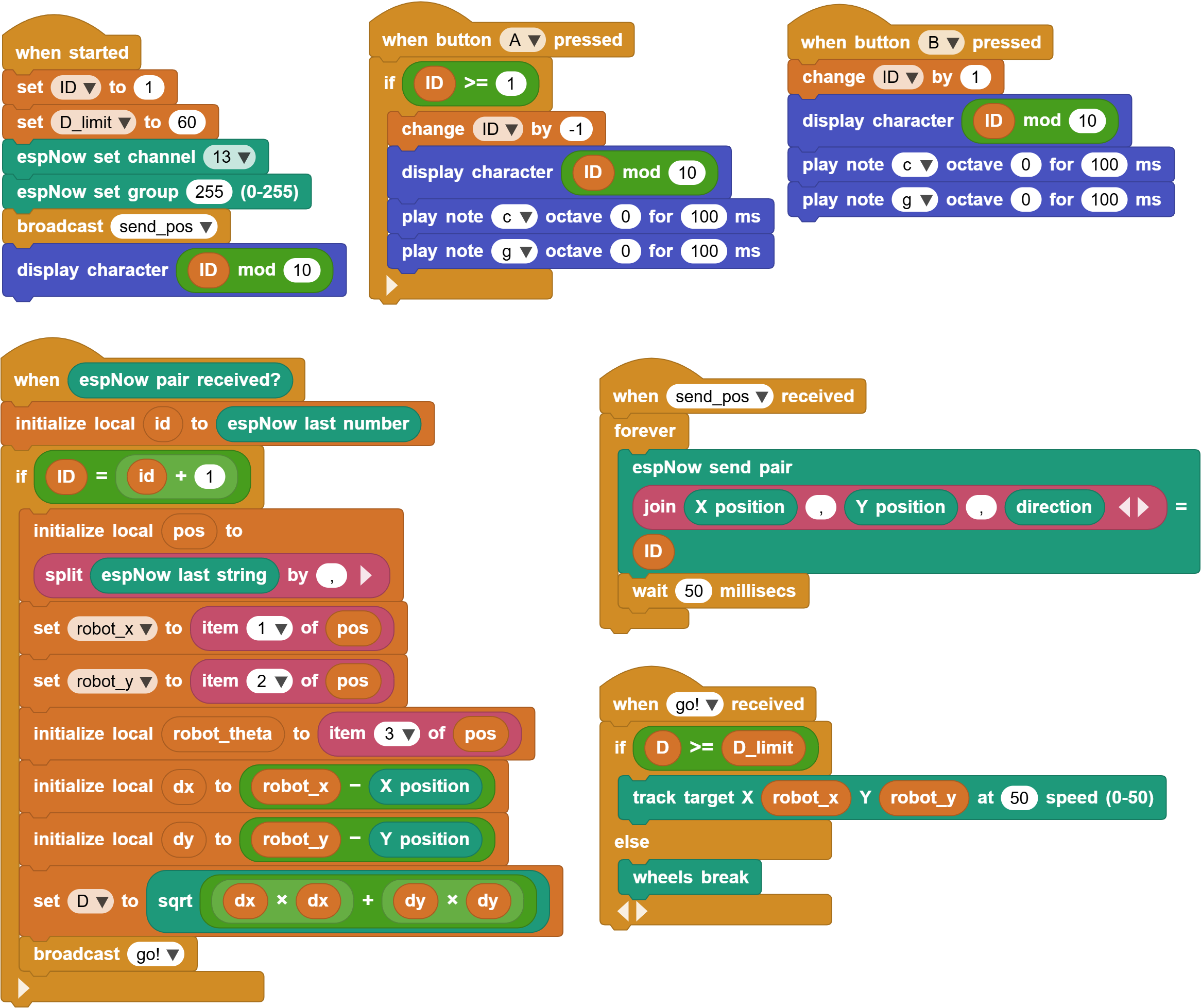
This program uses ESP-NOW to send position messages between robots. Each robot continuously broadcasts its own position. If a robot finds that it should follow the robot in front of it, it reads that robot's position and moves toward it when the distance is too large.
1. Demo
Prepare two or more CoCubes and download the same leader_follower online program to each robot. This project uses CoCube's map positioning function, so place the robots on a map that supports positioning, such as the soccer map, maze map, transparent map, or another custom map.
After the program starts, each robot displays its own ID on the screen:
- ID
1: the leader robot. - ID
2: follows robot1. - ID
3: follows robot2.
Press A to decrease the ID by 1, and press B to increase the ID by 1. It is recommended to start numbering from 1. If the ID is accidentally set to 0, press B to change it back. After setting the IDs, place the robots on the map. Move robot 1 by hand, and robot 2 will try to follow it. If there is a robot 3, it will follow robot 2, forming a long robot line.
A classroom demo can follow this order:
- Start with two robots, set them to
1and2, move robot1by hand on the positioning map, and observe robot2following it. - Change the distance between the two robots and observe when the follower starts and stops.
- Add a third robot, set its ID to
3, and observe whether the formation follows section by section like a dragon lantern.
2. Core idea of the program
The key idea is to give each robot an ID.
Each robot continuously sends its position through ESP-NOW:
- Message content: X coordinate, Y coordinate, and direction.
- Message number: its own
ID.
When receiving a message, the robot first checks whether the message comes from the robot directly in front:
If my ID equals the received ID + 1, the message comes from the robot directly in front.
For example:
- Robot
2only follows robot1. - Robot
3only follows robot2. - Robot
4only follows robot3.
In this way, all robots can run the same program. By setting different IDs, they form a leader-follower formation.
3. ESP-NOW communication setup
When the program starts, it does several things:
- Set
IDto1. - Set
D_limitto60. - Set the ESP-NOW channel to
13and the group to255. - Broadcast
send_pos. - Display the current
ID.
D_limit is the following-distance threshold. When the distance between the front robot and the follower is greater than or equal to 60, the follower starts moving. When the distance is less than 60, the follower stops.
The send_pos script sends the current position every 50 milliseconds:
- Send the position and ID as an ESP-NOW pair message.
- Store the X coordinate, Y coordinate, and direction in the string part.
- Store
IDin the number part. - Wait
50milliseconds and send again.
Using ESP-NOW pair messages has two advantages here:
- The string part can store position data.
- The number part can store the robot ID.
4. How to decide whether to follow
When a robot receives an ESP-NOW message, it reads the sender's ID id.
If my ID equals id + 1, the program will:
- Read the position of the front robot.
- Calculate the distance
Dbetween the two robots. - Broadcast
go!.
The program splits the position string from the front robot into three values:
| Variable | Meaning |
|---|---|
robot_x |
Front robot X coordinate |
robot_y |
Front robot Y coordinate |
robot_theta |
Front robot direction |
This program mainly uses robot_x and robot_y, which are the position of the front robot. It then calculates the distance using the coordinate difference:
dx= front robot X coordinate - this robot's X coordinatedy= front robot Y coordinate - this robot's Y coordinateD = sqrt(dx * dx + dy * dy)
If D is too large, the follower is falling behind. If D is not large, the follower is already close enough.
5. Following action
After receiving the go! broadcast, the robot decides what to do based on the distance:
- If
D >= D_limit, runmove to target robot_x robot_y 50. - Otherwise, run
CoCube wheels break.
In other words, the follower does not keep moving all the time. It only moves toward the current position of the front robot when the distance is greater than the threshold.
The program includes an advanced block called track target. You need to turn on Advanced Mode before it appears in the CoCube library. This block makes the robot first point toward the target, then keep correcting its direction while moving:
- Calculate the distance to the target.
- If the distance is greater than
3, point toward the target. - Until the distance is less than
3, keep recalculating the distance and angle error. - Adjust the left and right wheel speeds according to the angle error.
This prevents the follower from rushing in a straight line randomly. Instead, it keeps correcting the left and right wheel speeds according to the direction of the target point. Compared with the move to target point function in the CoCube library, track target is non-blocking. You can continuously send new coordinates to the robot, and it will always move toward the latest coordinate point.
6. Extension challenges
Dragon lantern formation
Use 4 or more CoCubes and set their IDs to
1, 2, 3, 4. Observe whether they can form a continuous following line.Group competition
Set different ESP-NOW groups or channels for different groups so each robot team only follows its own group.
Add autonomous movement to robot
1, such as moving along a circular path, and see whether the other robots can keep up.