ESP-NOW Firefly Synchronization
In a forest at night, many fireflies may start by flashing at different times. After a while, they can gradually form a rhythm: first a small group flashes together, and later a large group flashes almost at the same time.
This project uses ESP-NOW to create an "electronic firefly" experiment. Each board acts as one firefly: it flashes according to its own rhythm, and when it hears a nearby partner flash, it nudges its own rhythm forward a little. After running for a while, several boards will gradually synchronize their flashes.
Reference:
1. Demo
Prepare 3 or more MicroBlocks boards that support ESP-NOW, and download the same program firefly.ubp to each board.
After the program starts, each board starts its own internal clock, flashes at regular intervals, and receives flash messages from other boards. At first, their flash times may be different. After observing for a while, you will see the flashes gradually move closer together and finally become more synchronized.
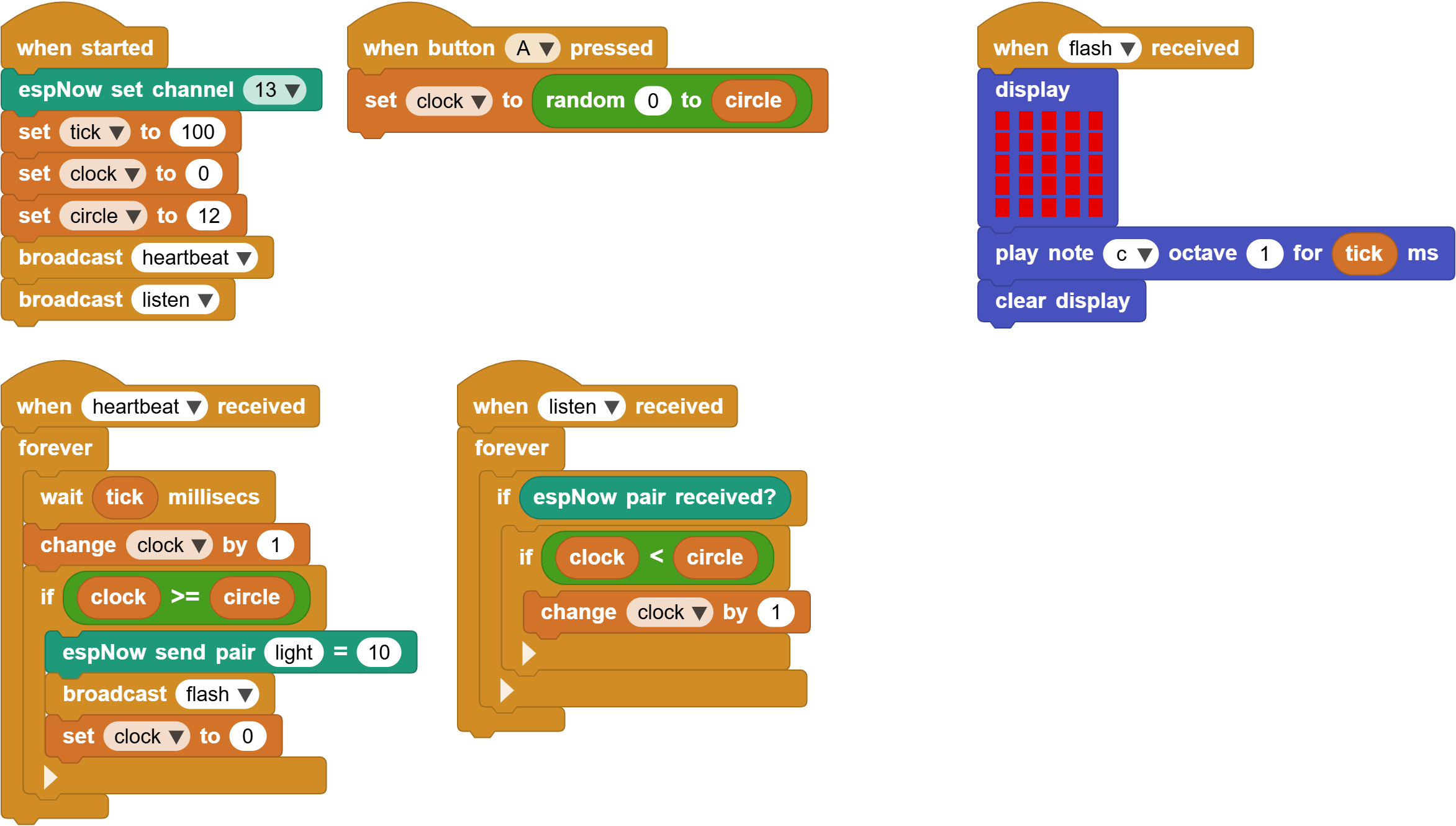
Open the complete program in MicroBlocks
A classroom demo can follow this order:
- Turn on only 1 board first and observe it flashing at a fixed rhythm.
- Turn on the 2nd and 3rd boards and observe that they are not synchronized at the beginning.
- Put the boards closer together and wait for them to gradually synchronize.
- Press the A button on one board to randomly disturb its internal clock, then observe how it joins the group rhythm again.
2. How fireflies synchronize
This program uses three variables to simulate the internal rhythm of one firefly:
tick: the time for one clock step. In this program, the default value is100milliseconds.clock: the current clock value. You can think of it as "which step the firefly has reached."circle: one complete cycle. In this program, the default value is12.
You can imagine clock as a small circular clock:
The IDs are 0, 1, 2, 3, ... 11, 12 in order.
When clock reaches circle, the board flashes once and resets clock to 0.
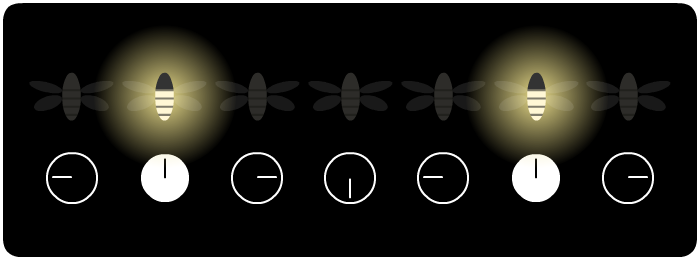
The core logic can be understood as:
- Every
1tick, increaseclockby1. - When
clock >= circle, send the ESP-NOW messagelight. - Flash and set
clockback to0.
The key to synchronization is: when a board hears another board flash, it gently pushes its own clock forward.
- When an ESP-NOW message arrives, check whether
clock < circle. - If it is true, increase
clockby1.
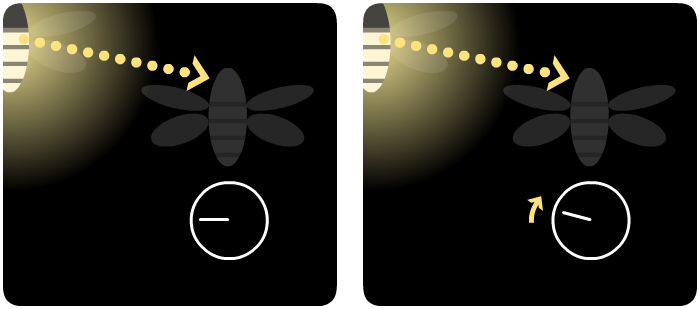
This action is called a "nudge." It does not make all boards synchronize immediately; it only lets boards that are behind catch up a little. Many small nudges added together gradually make the whole group form the same rhythm.
3. Advantages of ESP-NOW
ESP-NOW is well suited for this project because it does not require devices to connect to a server before communicating. Instead, devices can directly send short messages to each other.
In this project, ESP-NOW has several clear advantages:
No router is needed. There is no need to configure a WiFi name or password in the classroom.
It is suitable for one-to-many broadcasts. When one "firefly" sends the
lightmessage, nearby devices can receive it.It has low latency and visible feedback. Students can directly see the effect of "I flashed once, and others were affected."
It is suitable for group behavior experiments. With 2 boards, students can observe mutual influence; with 3 or more boards, the synchronization process is easier to see.
ESP-NOW also has a relatively long communication range. If conditions allow, the firefly synchronization experiment can be carried out across the whole classroom.
4. Questions to explore
Change
tick
A smallertickmakes the flashing rhythm faster; a largertickmakes the rhythm slower.Change
circle
A smallercirclemakes flashes more frequent; a largercirclemakes the interval between flashes longer.Change the nudge size
Currently, after receiving a message, the program only doesclock += 1. What happens if it becomesclock += 2orclock += 3? Will synchronization be faster? Will it become easier to disturb?Add message filtering
Responding only to thelightmessage can make the program more stable in a classroom with many people and many devices.Use different channels
Set different groups to different ESP-NOW channels so each group of fireflies only synchronizes within its own group.